
Starting an online business has never been easier.
A few years ago, launching an online store usually meant hiring a web developer, paying a designer, learning complicated software, and spending weeks or even months building a website. For many small businesses, freelancers, and first-time entrepreneurs, that process was expensive and overwhelming.
Today, things look very different.
With an AI Website Builder, anyone can create a professional website in minutes. Instead of writing code or choosing from hundreds of templates, you simply describe your business, your products, and your goals. The AI then generates a complete website with layouts, content, images, and pages that are ready to customize.
However, building a website is only the first step.
If your goal is to make money online, your website needs to become an online store. That means adding products, accepting payments, managing orders, and creating a shopping experience that encourages visitors to become customers.
The good news is that modern AI tools make this process much easier than traditional website development.
Whether you sell handmade crafts, clothing, beauty products, digital downloads, furniture, fitness programs, online courses, or professional services, an AI Website Generator can help you launch faster while keeping costs low.
This beginner's guide explains everything you need to know about turning an AI-generated website into a successful online store. By the end, you'll understand how AI simplifies the entire process, which features matter most, and how to prepare your store for long-term growth.
An AI Website Builder is software that uses artificial intelligence to create websites automatically based on your business information.
Instead of manually selecting layouts, colors, fonts, and page structures, you simply answer a few questions or describe your business in plain English. The AI then creates a website that matches your industry and goals.
For example, if you tell the AI:
"I own a dental clinic in New York offering cosmetic dentistry and emergency dental care."
The AI can automatically generate:
A homepage
Service pages
About Us page
Contact page
Appointment section
Professional images
Business copy
SEO-friendly headings
Mobile-responsive layouts
Within minutes, you have the foundation of a professional business website.
Although every platform works differently, the overall process is surprisingly simple.
The AI collects information about your business, including:
Business name
Industry
Products or services
Target audience
Preferred design style
Brand colors
Business goals
Instead of leaving you with blank pages, the AI creates:
Headlines
Paragraphs
Product descriptions
Call-to-action buttons
Frequently Asked Questions
Contact information sections
This saves hours of writing while giving you content you can easily edit later.
The AI selects layouts that fit your industry.
For example:
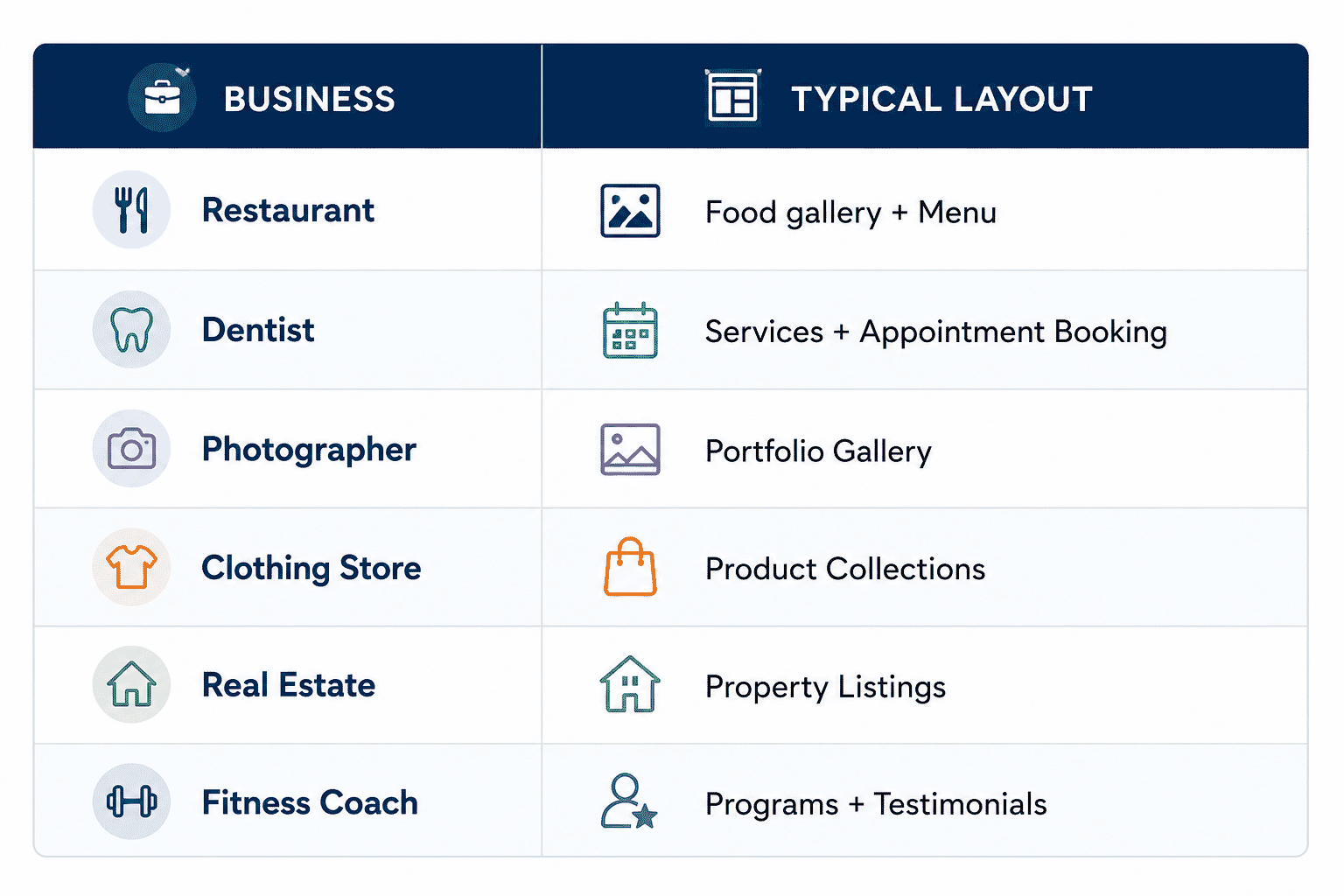
Instead of starting with a blank canvas, you receive a professionally organized website.
Many AI builders automatically include:
Responsive design
Basic SEO structure
Navigation menus
Contact forms
Image optimization
Mobile-friendly pages
As a result, the website is much closer to launch than one built entirely from scratch.
Many beginners wonder whether AI websites are actually better than hiring a developer.
The answer depends on your business goals.
For most startups and small businesses, AI dramatically reduces both cost and development time.
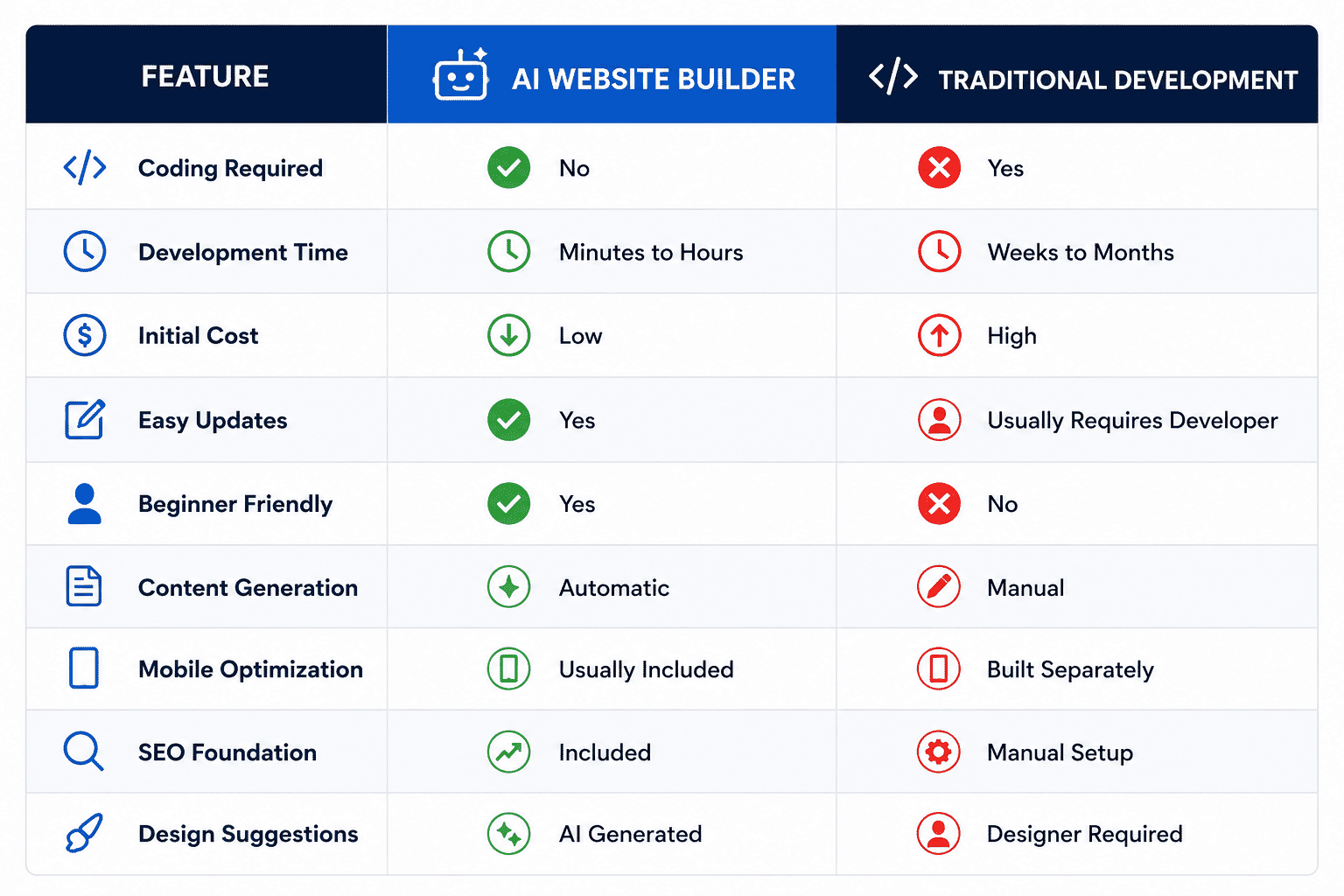
Traditional development still has advantages for highly customized enterprise applications. However, most small businesses simply need a professional website that attracts customers and generates sales.
For those businesses, AI provides an excellent balance between speed, affordability, and quality.
The short answer is yes.
In fact, thousands of businesses now use AI-assisted platforms to launch online stores without hiring developers.
However, it's important to understand one thing.
An AI-generated website is only the starting point.
Think of it like building a physical retail shop.
The building itself is important, but it isn't enough.
You still need to:
Stock your shelves.
Organize your products.
Set prices.
Install a payment system.
Welcome customers.
Promote your business.
The same principle applies online.
An AI Website Builder creates the structure, but your products, branding, customer experience, and marketing determine whether your store succeeds.
A business website tells people about your company.
An online store allows people to buy from you.
That difference introduces several essential features.
Customers need an organized collection of products with categories, pricing, descriptions, and high-quality images.
Instead of buying one item immediately, shoppers can save multiple products before checking out.
Customers expect a fast, secure payment process with trusted payment methods.
A complicated checkout process is one of the biggest reasons shoppers abandon their carts.
Every purchase should automatically create an order for both the customer and the business owner.
Order tracking improves customer confidence.
Knowing exactly how much stock remains prevents overselling and keeps customers informed.
Returning customers appreciate being able to view previous orders, save addresses, and reorder products quickly.
Whether you offer local delivery, national shipping, or international fulfillment, your store should clearly explain delivery costs and estimated arrival times.
Coupons, seasonal promotions, and special offers help increase conversions while encouraging repeat purchases.
People trust other customers.
Displaying authentic reviews helps reduce uncertainty and increases sales.
Imagine Sarah owns a small handmade candle business.
Without AI, she might spend several weeks finding a designer, purchasing a template, writing product descriptions, learning basic coding, and configuring payment systems.
With an AI Website Builder, Sarah describes her business in a few sentences.
Within minutes, she receives:
A beautifully designed homepage
Product collections
About page
Contact page
Mobile-friendly layout
SEO-ready page structure
She then adds:
25 candle products
Secure payment gateway
Shipping information
Customer reviews
Product photos
Instead of spending months preparing her website, Sarah focuses on growing her business and marketing her products.
This is exactly why AI-powered website creation has become so popular among small businesses.
Once your AI-generated website is ready, it's time to transform it into a store that customers can buy from.
Rather than trying to do everything at once, work through each stage carefully.
This may seem obvious, but many beginners skip this step.
Before uploading products, define your catalog clearly.
Ask yourself:
What products will I sell?
How many products will I launch with?
Are they physical or digital?
Do they have different sizes or colors?
Will customers need customization?
Starting with 20 well-prepared products is usually better than launching with 300 incomplete listings.
Imagine walking into a supermarket where everything is placed randomly.
Shopping would become frustrating.
The same applies to online stores.
Create logical categories such as:
Men's Clothing
Women's Clothing
Accessories
Footwear
Skincare
Hair Care
Makeup
Fragrances
Smartphones
Laptops
Accessories
Smart Home Devices
Categories make navigation easier while helping search engines understand your website structure.
Many businesses simply copy manufacturer descriptions.
That is a mistake.
Instead, explain the product in plain language.
A good product description answers questions like:
What is this product?
Who is it for?
What problem does it solve?
What makes it different?
How should it be used?
For example:
Weak Description
Cotton T-shirt. Blue. Available in multiple sizes.
Better Description
Stay comfortable all day with this lightweight cotton T-shirt made from breathable fabric. Its relaxed fit makes it perfect for casual wear, workouts, or weekend outings. Available in sizes S to XXL.
The second description focuses on benefits rather than features.
Customers cannot touch your products.
Images become their primary source of information.
Use:
White background images
Lifestyle photos
Close-up shots
Multiple viewing angles
Zoom capability
Avoid:
Blurry photos
Watermarked images
Inconsistent lighting
Tiny image sizes
Professional photography often increases conversion rates more than expensive website redesigns.
Customers expect a safe checkout process.
Support trusted payment methods appropriate for your market.
Your checkout should be:
Secure
Fast
Mobile-friendly
Easy to understand
Every unnecessary field increases the chances of cart abandonment.
Keep the checkout process as simple as possible.
Shipping is often overlooked until customers begin placing orders.
Decide:
Delivery locations
Shipping charges
Free shipping threshold
Estimated delivery time
Return shipping policy
Transparency builds trust.
Unexpected shipping costs are one of the biggest reasons customers abandon their carts.
Never launch without testing.
Complete several test purchases from start to finish.
Check:
Product pages
Shopping cart
Checkout
Payment confirmation
Order emails
Mobile responsiveness
Contact forms
Search function
Fix every issue before inviting real customers.
Launching is only the beginning.
To compete effectively, your online store should include features that improve the customer experience.
Speed affects both user experience and SEO.
Research consistently shows that visitors become less likely to stay as page load times increase. Even a few extra seconds can lead to fewer conversions.
Improve speed by:
Compressing images
Limiting unnecessary scripts
Using modern image formats
Choosing reliable hosting
A fast website keeps visitors engaged.
More than half of online shopping now happens on mobile devices.
Your store should work perfectly on:
Smartphones
Tablets
Laptops
Desktop computers
Always test your website on multiple screen sizes before launching.
Customers should never struggle to find products.
A clear navigation menu might include:
Home
Shop
Categories
Best Sellers
New Arrivals
About Us
Contact
Simple navigation reduces frustration and encourages browsing.
Visitors often know exactly what they want.
A search bar allows customers to find products quickly instead of navigating through multiple categories.
This becomes increasingly important as your product catalog grows.
Reviews reduce uncertainty.
When shoppers see that others have purchased and enjoyed your products, they feel more confident buying from you.
Encourage reviews after every purchase.
Display both positive and constructive feedback to build authenticity.
Customers are more willing to buy when they know they can return products if needed.
Your return policy should explain:
Return window
Product conditions
Refund process
Exchange options
Simple policies increase customer confidence.
People want to know that a real business exists behind the website.
Include:
Email address
Phone number
Business location (if applicable)
Contact form
Business hours
This helps establish credibility.
Trust is one of the biggest factors influencing online purchases.
Include:
SSL security
Secure payment badges
Customer testimonials
Verified reviews
Privacy Policy
Terms and Conditions
These elements reassure first-time visitors.
Every business has different needs, but the process remains similar.
An AI-generated website can showcase:
Fresh bakery items
Daily specials
Online ordering
Pickup scheduling
Customer reviews
The website can include:
Treatment pages
Online appointment booking
Dentist profiles
Insurance information
Patient testimonials
A professional portfolio website may feature:
Photo galleries
Service packages
Booking forms
Client reviews
Blog articles
An online fashion store can organize:
Seasonal collections
Product filters
Size guides
Wishlist functionality
Secure checkout
The website may offer:
Membership plans
Workout programs
Nutrition guides
Video courses
Online consultations
Although these businesses are very different, each can benefit from an AI Website Builder by reducing setup time and allowing owners to focus on serving customers rather than building websites.
Launching your online store is a major milestone, but it is only the beginning.
Many new business owners assume that once their website is live, customers will automatically find it. Unfortunately, that rarely happens.
Think of your online store like a physical shop. Even if it has an attractive design and high-quality products, people still need to know it exists.
The same principle applies online.
After your website is published, your focus should shift from building to growing.
This is where SEO, content marketing, social media, and customer trust become essential.
Many successful online stores receive a large percentage of their traffic through blog content.
A blog allows you to answer customer questions before they are ready to buy.
For example, if you sell skincare products, you could publish articles such as:
How to Choose a Face Moisturizer
Morning vs Evening Skincare Routine
Ingredients That Help Dry Skin
Someone searching for these topics may later purchase your products.
This approach builds trust before asking for a sale.
People rarely buy from businesses they do not trust.
Fortunately, trust can be built through small details across your website.
Include:
Real customer reviews
Business address
Contact information
Professional product photography
Frequently Asked Questions
Return policy
Privacy policy
Secure checkout badges
Every trust signal reduces uncertainty.
Stock photos have their place, but real images create stronger connections.
For example:
Instead of showing a generic coffee cup, a local café should display:
Their actual drinks
Their seating area
Their staff
Customers enjoying the experience
Authenticity often performs better than perfection.
Even well-designed websites can struggle if they make avoidable mistakes.
A store with 30 well-presented products often outperforms one with 500 poorly organized listings.
Focus on quality before quantity.
Many stores simply list specifications.
Customers want to know how a product improves their lives.
Instead of:
Stainless steel water bottle.
Explain:
Keep drinks cold for up to 24 hours with this insulated stainless steel bottle, making it ideal for commuting, hiking, or daily workouts.
Benefits sell more effectively than features.
If customers must zoom, scroll sideways, or struggle to tap buttons, many will leave without purchasing.
Always test your website on different devices.
Every additional step increases abandonment.
Keep checkout:
Simple
Fast
Secure
Ask only for information you truly need.
Visitors expect pages to load quickly.
Slow websites lose both rankings and customers.
Regularly monitor website performance and optimize images, scripts, and hosting.
Publishing your website is only the beginning.
Now you need consistent traffic.
The strongest businesses usually combine several marketing channels.
SEO provides long-term traffic.
Although results take time, high rankings can deliver visitors for months or even years.
Continue improving:
Product pages
Category pages
Blog articles
Internal links
SEO compounds over time.
Every visitor may not purchase immediately.
Offer something valuable in exchange for an email address, such as:
Buying guide
Discount
Free checklist
Exclusive content
Email allows you to stay connected until customers are ready to buy.
Different platforms support different goals.
Instagram works well for visual products.
LinkedIn helps B2B businesses.
Facebook supports community building.
Pinterest performs well for home décor, fashion, recipes, and DIY products.
Focus on platforms where your audience spends time.
Paid advertising can accelerate growth while SEO gains momentum.
Popular channels include:
Google Search Ads
Google Shopping Ads
Facebook Ads
Instagram Ads
Rather than promoting your homepage, send visitors to the most relevant product or landing page.
Search is changing.
Google increasingly summarizes answers directly within search results through AI-generated overviews.
To improve your chances of appearing:
Answer questions clearly.
Use descriptive headings.
Keep paragraphs concise.
Include numbered steps where appropriate.
Use comparison tables.
Add FAQs.
Support important claims with credible sources.
Write for humans first.
When your content is easy to understand, AI systems are more likely to reference it.
Google values content that demonstrates:
Experience
Expertise
Authoritativeness
Trustworthiness
One of the easiest ways to improve EEAT is by sharing practical knowledge instead of generic advice.
For example:
Instead of saying:
Add customer reviews.
Explain why:
A local salon that displays verified customer reviews alongside before-and-after photos helps new visitors feel more confident about booking an appointment.
Real-world examples make content more useful.
Imagine David owns a family furniture store.
Previously, he relied on walk-in customers and word-of-mouth referrals.
Using an AI Website Builder, he creates an online store showcasing dining tables, sofas, office desks, and bedroom furniture.
He then:
Writes detailed product descriptions.
Uploads professional images.
Publishes weekly blog articles about home décor.
Share customer projects on Instagram.
Optimizes every product page for SEO.
Over time, his website begins attracting visitors searching for furniture online. Instead of depending only on local foot traffic, he reaches customers across a much wider area.
The technology helped him launch quickly, but consistent marketing and valuable content supported long-term growth.
Artificial intelligence is changing how businesses build and manage websites. What once required teams of designers, developers, copywriters, and marketers can now be accomplished much faster with AI-assisted tools.
However, AI should be viewed as a productivity tool rather than a replacement for business strategy.
An AI-generated website can provide an excellent starting point, but long-term success still depends on understanding your customers, offering quality products, and delivering a great shopping experience.
In the coming years, AI-powered online stores are expected to become even more intelligent by helping businesses:
Personalize shopping experiences.
Recommend products based on customer behavior.
Generate product descriptions automatically.
Improve customer support with AI assistants.
Optimize pricing strategies.
Identify sales trends.
Predict inventory requirements.
Create marketing campaigns faster.
Businesses that combine these capabilities with strong customer service and consistent marketing will be better positioned for long-term growth.
Before you officially launch your online store, review this checklist.
✔ Mobile-friendly design
✔ Fast loading speed
✔ Secure HTTPS connection
✔ Easy navigation
✔ Clear branding
✔ High-quality images
✔ Unique product descriptions
✔ Accurate pricing
✔ Organized categories
✔ Stock availability
✔ Simple checkout
✔ Multiple payment options
✔ Shipping information
✔ Return policy
✔ Contact information
✔ Optimized page titles
✔ Meta descriptions
✔ Internal links
✔ Image alt text
✔ Schema markup
✔ XML sitemap
✔ Google Analytics
✔ Google Search Console
✔ Social media accounts
✔ Email marketing setup
✔ Blog section
✔ Review collection strategy
Completing these items gives your store a stronger foundation for attracting visitors and converting them into customers.
An AI Website Builder uses artificial intelligence to generate a website based on your business information. Instead of designing pages manually, it creates layouts, content, navigation, and other essential elements automatically, helping users launch websites much faster.
Yes. Most modern AI website builders can create online stores that include product pages, shopping carts, payment integrations, inventory management, and secure checkout functionality.
No.
A No Code Website Builder removes the need for programming, while an AI Website Builder goes a step further by generating much of the website automatically.
Yes, provided you continue optimizing it.
AI can generate an SEO-friendly foundation, but factors such as content quality, page speed, keyword optimization, backlinks, and user experience remain essential for achieving strong search rankings.
Yes.
You can typically edit text, images, layouts, colors, branding, and pages after the AI generates the initial version. This allows you to tailor the website to your business while saving significant development time.
You can sell almost any type of product or service, including:
Physical products
Digital downloads
Online courses
Memberships
Professional services
Event tickets
Gift cards
Focus on quality rather than quantity.
Launching with 20 to 50 well-presented products is often more effective than publishing hundreds of incomplete listings.
Many new store owners spend all their time building the website and very little time promoting it.
A successful online store requires continuous SEO, content marketing, email marketing, and social media efforts to attract customers.
With an AI Website Generator, a basic website can often be created within minutes. Depending on the number of products and the amount of customization, most businesses can prepare an online store for launch within a few days.
Yes.
It is particularly beneficial for startups, freelancers, local businesses, agencies, and entrepreneurs who want to launch quickly without investing heavily in traditional web development.
Creating an online store no longer requires months of planning or a large development budget. Thanks to modern AI technology, entrepreneurs can build professional websites, add products, configure payments, and start selling faster than ever before.
An AI Website Builder simplifies the technical aspects of website creation, while an AI Website Generator helps produce layouts, content, and designs in minutes. When combined with the flexibility of a No Code Website Builder, businesses of all sizes can create professional online stores without writing a single line of code.
However, launching your website is only the first step.
Long-term success comes from continuously improving your store, publishing valuable content, optimizing for search engines, and listening to customer feedback. Small improvements made consistently can have a significant impact over time.
Whether you're starting a local bakery, opening a clothing brand, offering professional services, or selling digital products, the right combination of AI, strategy, and customer focus can help you build an online store that not only looks professional but also delivers real business results.
The businesses that succeed will not simply use AI to build websites. They will use AI to save time, improve efficiency, and focus on what matters most: creating value for their customers.
An AI Website Builder can create the foundation of a professional website in minutes.
An AI Website Generator helps automate layouts, content, and page creation.
A No Code Website Builder allows customization without programming.
A successful online store needs more than attractive design. It requires secure payments, product organization, trust signals, and ongoing marketing.
SEO, content marketing, and customer experience play a major role in long-term growth.
AI accelerates website creation, but business success depends on delivering value and continuously improving your online presence.
Turn your ideas into fully functional apps using intelligent automation. Design, build, and launch, all in one seamless workflow.
Build Your App Today!