
Building a website used to be difficult. You needed coding skills, design knowledge, and sometimes a large budget just to get started.
Today, things are different.
With an AI website builder, almost anyone can create a professional website in a few hours. You simply describe your idea, and AI helps generate layouts, pages, content, and designs automatically.
Whether you want to launch a business website, portfolio, blog, online store, or even a web application, modern AI tools make the process much easier.
In this guide, you'll learn exactly how to create a website from scratch in 10 simple steps, even if you've never built one before.
You can create a website from scratch by choosing a domain name, defining your website goals, selecting an AI website builder, generating your website layout, customizing the design, adding content, optimizing for SEO, testing functionality, connecting a custom domain, and publishing your site. Modern AI tools make this process much faster and easier than traditional website development.
Before building your website, it helps to understand a few basics.
A website is made up of three main components:
Domain Name
Website Design
Website Content
For example:
If you own a bakery called Sweet Treats:
Domain: sweettreats.com
Design: How the website looks
Content: Text, images, products, and contact details
Traditionally, creating these parts required developers and designers.
Today, an AI website builder can help generate most of them automatically.
Many platforms even function as an AI web app builder, allowing users to create interactive tools, portals, dashboards, and web applications without coding.
This is why AI-powered website creation is growing rapidly among startups, freelancers, and small businesses.
Firstly, decide why you're creating a website.
Common goals include:
Selling products
Generating leads
Sharing information
Building a personal brand
Offering services
Creating a web application
When you know your goal, every other decision becomes easier.
A photographer may need:
Portfolio pages
Gallery section
Contact form
Meanwhile, a restaurant may need:
Menu page
Reservation form
Location map
Your domain name is your website address.
Examples:
nike.com
amazon.com
spotify.com
Good domains are:
Short
Easy to remember
Easy to spell
Relevant to your business
Choose:
greenleaflandscaping.com
Avoid:
greenleaf-landscaping-company-online123.com
This is where AI can save significant time.
A modern AI website builder helps users:
Generate website layouts
Create content
Design pages
Build navigation menus
Add images
Launch faster
Some platforms also act as a no code website builder, allowing users to build websites without writing code.
Choose a platform that offers:
AI website generation
Responsive design
SEO features
Fast loading speed
Custom domains
Content management
Web app capabilities
If you plan to build more advanced projects, consider an AI web app builder that supports forms, databases, user accounts, and workflows.
Next, create your website pages.
Most websites need:
Home
About
Services
Blog
Contact
E-commerce websites may also need:
Shop
Product Pages
Cart
Checkout
AI tools can generate these pages automatically.
This creates a strong foundation before you start customizing.
Now make the website look like your brand.
Customize:
Colors
Fonts
Images
Buttons
Layouts
Logos
Choose:
2-3 colors
1-2 fonts
Too many styles can make a website look messy.
Consistency improves trust.
Content is what visitors come to see.
Add:
Clear headlines
Helpful information
Images
Videos
Testimonials
Instead of writing:
"We provide innovative solutions."
Write:
"We help local businesses get more customers through digital marketing."
Specific content performs better.
SEO helps people find your website on search engines.
Focus on:
Example:
"Best Bakery in Chicago"
Summarize page content clearly.
Use:
H1
H2
H3
properly.
Use keywords naturally.
Avoid stuffing keywords repeatedly.
Connect related pages together.
Compress images and add descriptive alt text.
More than half of web traffic comes from mobile devices.
Therefore, test:
Navigation
Buttons
Forms
Images
Menus
Your website should look good on:
Phones
Tablets
Desktop computers
Most AI website builders automatically create responsive designs.
Before launching, check:
Submit every form.
Click every button.
Ensure images load correctly.
Test loading times.
Fix grammar and spelling mistakes.
A small error can reduce trust.
Finally, launch your website.
However, publishing is only the beginning.
Monitor:
Traffic
User behavior
Search rankings
Conversions
Regular improvements often lead to better results over time.
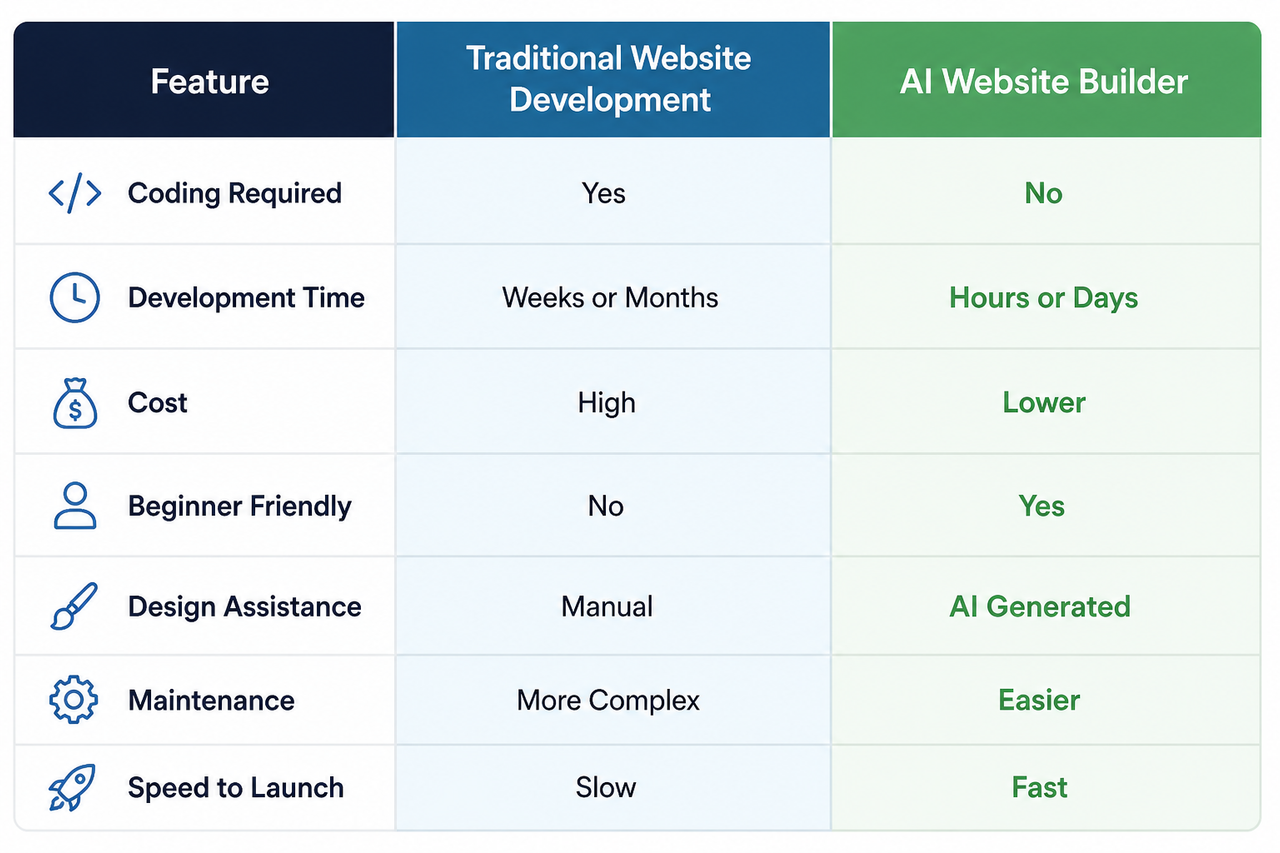
Modern AI-powered platforms offer several advantages.
What once took weeks can often be completed in hours.
You may not need developers or designers for basic websites.
No coding knowledge is required.
Many platforms include:
Meta tags
Structured layouts
Mobile optimization
Content changes can be made quickly.
AI tools are powerful, but they are not perfect.
Some AI-generated layouts may look similar.
Always review generated content.
Advanced projects may still require developers.
AI can build a website.
It cannot automatically guarantee rankings.
A plumbing company uses an AI website builder to create:
Homepage
Service pages
Contact form
The website launches within a day.
A designer creates:
Portfolio
About page
Client testimonials
No coding required.
A founder uses an AI web app builder to launch:
User registration
Dashboard
Database
Forms
This helps validate an idea before investing heavily in development.
Keep it short and memorable.
Always test on phones.
Focus on helping visitors.
Check every page first.
Search visibility matters from day one.
Start simple
Focus on user experience
Use clear navigation
Keep page speed fast
Publish helpful content regularly
Optimize every page for SEO
Collect customer feedback
Update information frequently
Website creation is changing rapidly.
Several trends are shaping the future:
AI is becoming better at creating unique layouts.
Content creation continues to improve.
The demand for no code website builder platforms is growing.
More businesses are using AI web app builders to launch software products without development teams.
AI will increasingly create websites tailored to each visitor.
Yes. Modern AI website builders allow users to create websites without writing code.
An AI website builder uses artificial intelligence to generate websites, designs, content, and layouts automatically.
A simple website can often be created within a few hours.
Yes, provided they follow SEO best practices and contain helpful content.
Yes. Many small businesses use AI tools to launch websites quickly and affordably.
An AI web app builder helps users create web applications without traditional coding.
Yes. Most platforms support custom domains.
Most modern builders automatically create responsive designs.
Yes. Many platforms support online stores and payment gateways.
Costs vary. AI builders are generally cheaper than hiring developers.
At minimum:
Home
About
Contact
Most businesses should also have service or product pages.
Yes. AI tools have significantly lowered the learning curve.
An AI website builder simplifies website creation.
Beginners can launch websites without coding.
Start by defining clear goals.
Choose a memorable domain name.
Focus on useful content and SEO.
Test everything before publishing.
Mobile optimization is essential.
AI web app builders can help create more advanced applications.
Continuous improvements lead to better long-term results.
Creating a website from scratch is no longer a complicated process reserved for developers.
With a modern AI website builder, beginners can create professional websites quickly, affordably, and without coding knowledge. By following the 10 steps outlined in this guide, you can move from idea to launch with confidence.
Whether you're building a personal portfolio, business website, online store, or using an AI web app builder to create a more advanced solution, the key is to start with a clear goal, focus on user experience, and continuously improve your website over time.
The best websites are not necessarily the most complex. They are the ones that solve real problems and provide value to their visitors.
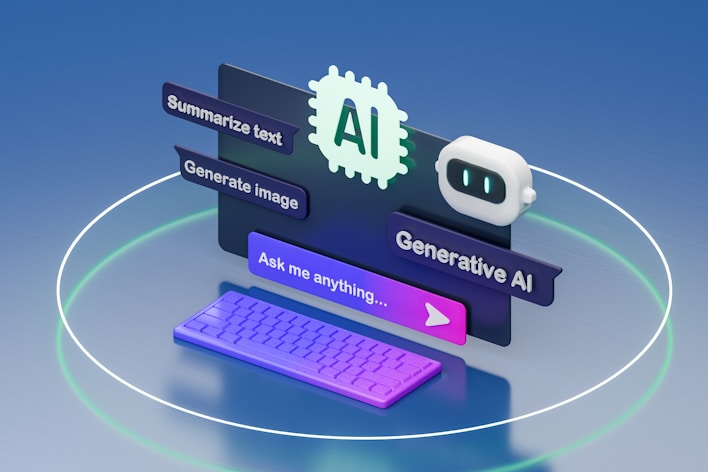
Turn your ideas into fully functional apps using intelligent automation. Design, build, and launch, all in one seamless workflow.
Build Your App Today!